
Project Phase & Milestone Tracking
Clients often ask how they can measure the number of iterations (back‑and‑forth review rounds) made to a survey link—from the moment the initial link is shared until final sign‑off.
SurveyTester provides a flexible and structured way to track these iterations using Milestones / Phases, enabling teams to measure time, effort, and iteration counts across the entire project lifecycle.
How to Use Milestones and Related Features to Track Testing Phases and Iterations
You can track each phase of the testing process by creating Milestones that represent each round of changes, reviews, or quality checks.
Milestones allow you to monitor:
- The total number of testing rounds completed
- When each round started and ended
- The number of issues logged in each iteration
- The duration of each milestone
- Which issues were resolved before progressing to the next phase
Once multiple milestones are created, SurveyTester provides several views and tools to analyze project progress and iteration effort.
1. Creating Milestones Using Issue Status
Milestones can be used to structure workflow phases such as:
- Internal process stages (e.g., Ready for QC, Script Update Needed)


Filtering issues by these statuses adds an additional layer of visibility into testing progress.
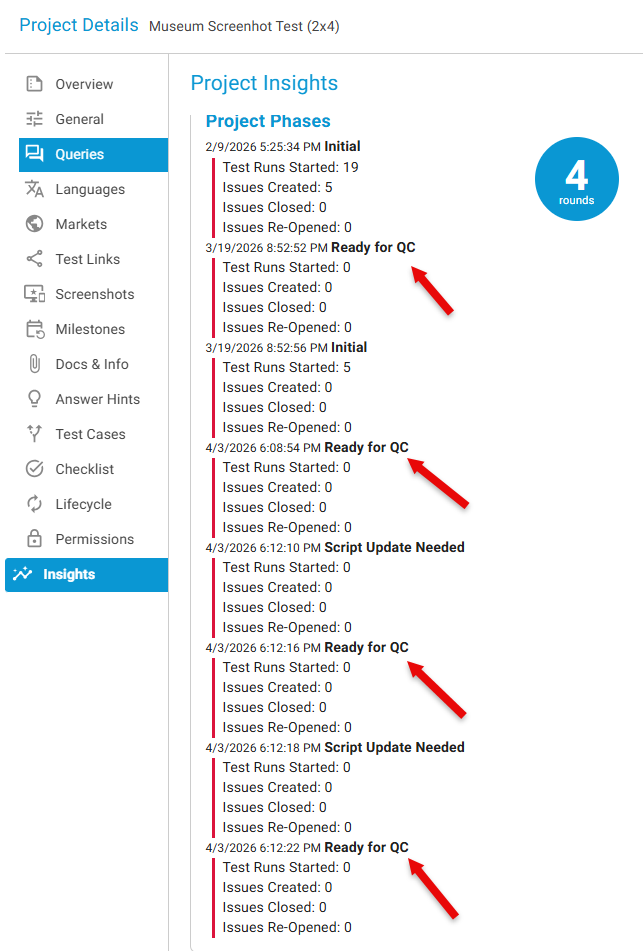
2. Insights → Tracking Project Phase
The Insights section provides automatic analytics for each phase, including:
- Duration per phase
- Workload per testing round
- Counts of issues, comments, and resolutions
- Performance comparisons across milestones
Recommended Workflow for Measuring Iterations
- Create Milestone: Initial Link Shared
- Team tests the survey → issues are logged
- Developer updates the script
- Create Milestone: Ready for QC – Round 1
- Retest → new issues are logged
- Developer addresses remaining issues
- Create Milestone: Ready for QC – Round 2
- Repeat until final approval
- Create Milestone: Final Sign‑off
Combined with start and end timestamps, milestones create a clear and auditable record of project effort.
Important: Manually created milestones do not generate a new Phase for phase counting. A new Phase (along with its round‑based analytics) is created only when Milestones are added using the Issues → Project Phase drop‑down list.
3. Creating Custom Milestones
Milestones can also be created manually for:
- Each round of testing (e.g., Round 1, Round 2, Final QC, Sign‑off)
- Significant project events (e.g., Initial Link Shared, Major Script Update, Final Review)
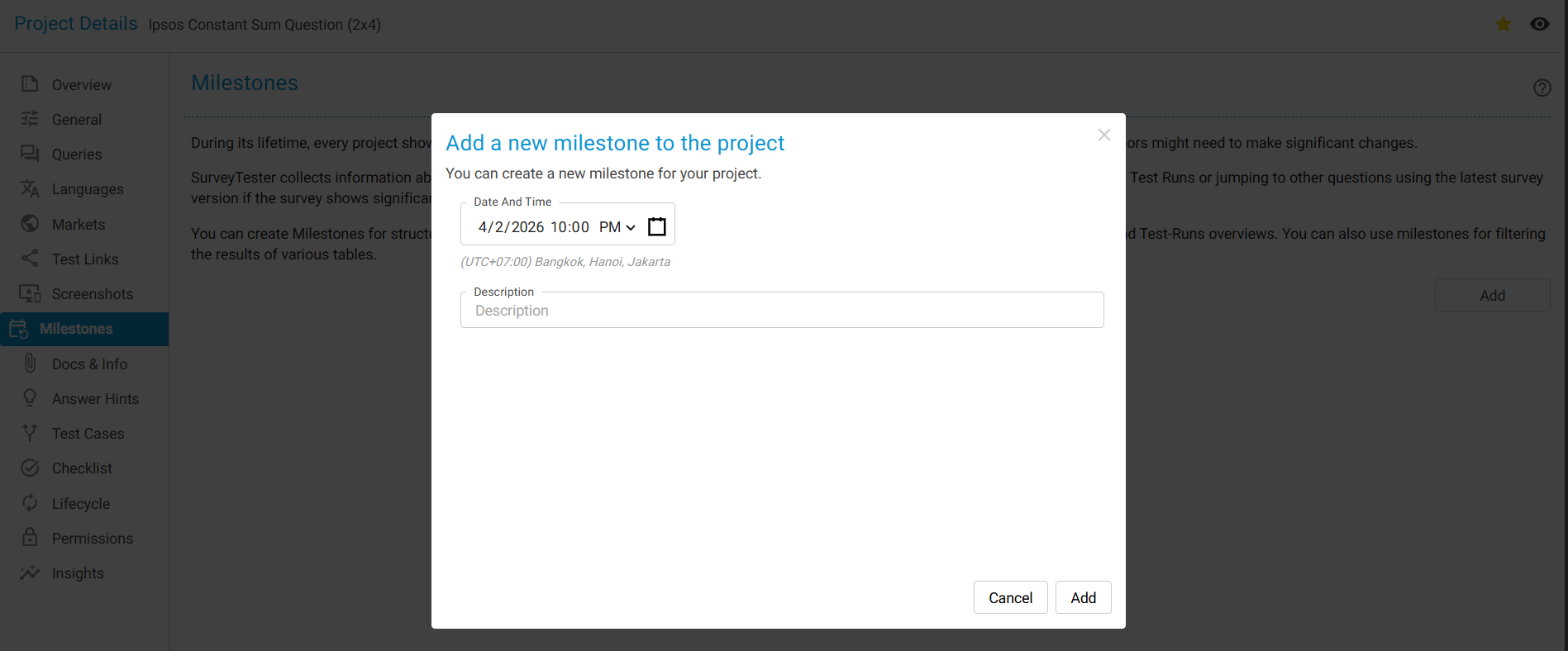
You should add a new Milestone whenever:
- A major script or link update is released
- A testing or feedback round is completed
- The project moves into a new phase
This creates a clear historical timeline of testing activity. However, manually created milestones cannot be used for tracking phase iteration counts.
To learn more about How to Use Milestones click here.
Benefits of Using Milestones
✅ Track the total number of revision rounds
✅ Measure testing time per iteration
✅ Demonstrate progress and quality improvements
✅ Provide transparency to clients and vendors
✅ Simplify audits and post‑project reviews
✅ Maintain a structured testing history
✅ Measure testing time per iteration
✅ Demonstrate progress and quality improvements
✅ Provide transparency to clients and vendors
✅ Simplify audits and post‑project reviews
✅ Maintain a structured testing history
Summary
SurveyTester does not automatically label iterations. However, Milestones provide a powerful and structured way to track every testing phase, measure time and effort, and count the total number of iteration cycles.
By consistently creating milestones for each testing round or build update, teams gain complete visibility—from the initial survey link through to final sign‑off.
GLOSSARY:
What Is an Iteration?
An iteration is a complete testing round that includes:
- Survey testing
- Issue logging
- Script or survey updates
- Retesting and validation
Each iteration should be represented by a Milestone.
Key Concepts
-
Milestone
A labeled checkpoint representing a testing round or project phase (e.g., Initial Link, QC Round 1, Final Sign‑off). -
Phase
A system‑generated grouping used for analytics and iteration counts. Phases are created only when milestones are added via the Issues → Project Phase dropdown. -
Issue Status
Status labels (e.g., Ready for QC, Update Needed) used to organize workflow within a milestone.