
Manage Locked Roles
Roles and Permissions Management
Roles determine which features and functions users can access within the SurveyTester platform. Proper role management helps maintain security, ensures users have the correct level of access, and prevents accidental changes to critical system settings.
Admin roles are created and managed exclusively by the SurveyTester Support Team. These roles are locked to prevent accidental removal of essential permissions and platform capabilities.
Use Roles and Permissions to:
- Control access to platform features.
- Assign responsibilities based on user functions.
- Create customized access levels for different teams.
- Maintain security and operational control within the organization.
Admin Role Management
Locked Admin Roles
Admin roles are created by the SurveyTester Support Team and cannot be modified to remove core permissions.
This safeguard ensures that critical platform capabilities remain accessible and prevents accidental restriction of important administrative functions.
Requesting Additional Features
If your organization requires access to additional features or modules:
- The Administrator must submit a request to support@surveytester.com.
- Include details of the feature or permission required.
- The SurveyTester Support Team will review and grant the requested access if approved.
- Once access has been assigned to the Admin role, administrators can distribute the permissions to other roles as required.
Creating a New Role from an Existing Role
Duplicating an existing role is the recommended method for creating new roles because it preserves existing permissions and reduces setup time.
Steps
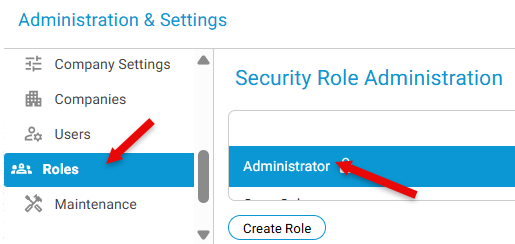
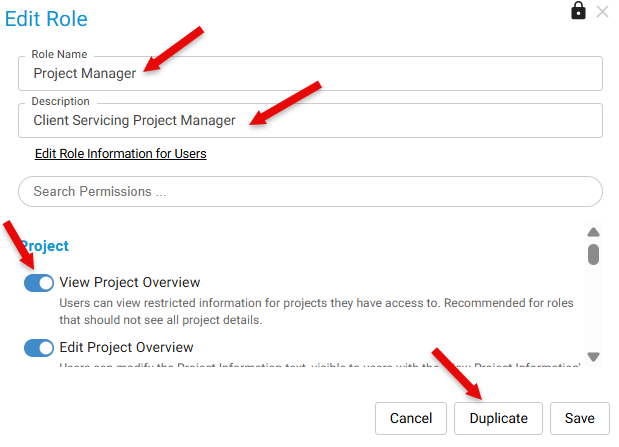
Managing Role Permissions
After creating a role, administrators can:
- Enable or disable feature access.
- Assign permissions based on user responsibilities.
- Restrict access to administrative functions.
- Control visibility of specific modules and tools.
Note: Permission availability depends on the features assigned and enabled for your organization.
Best Practices
- Use existing roles as templates whenever possible.
- Follow the principle of least privilege by granting only the permissions required for each role.
- Review role permissions periodically to ensure continued compliance with organizational requirements.
- Test newly created roles before assigning them to a large number of users.
Important Notes
Administrative Continuity Recommendation
SurveyTester strongly recommends maintaining at least two to three active Administrators within the organization.
This ensures that:
- Administrative access is retained if personnel changes occur.
- Critical platform settings remain accessible.
- User management and permission changes can continue without interruption.
- Access can be recovered quickly if an administrator becomes unavailable.
Example Use Case
A company currently uses a Field Supervisor role that has access to survey assignments, reporting, and team management.
The administrator needs a new Regional Supervisor role with similar permissions but additional reporting capabilities.
To create the role:
- Open the existing Field Supervisor role.
- Update the role name to Regional Supervisor.
- Enable the required reporting permissions.
- Click Duplicate to create the new role.
- Assign users to the newly created role.
This approach ensures consistency while reducing the effort required to configure permissions from scratch.